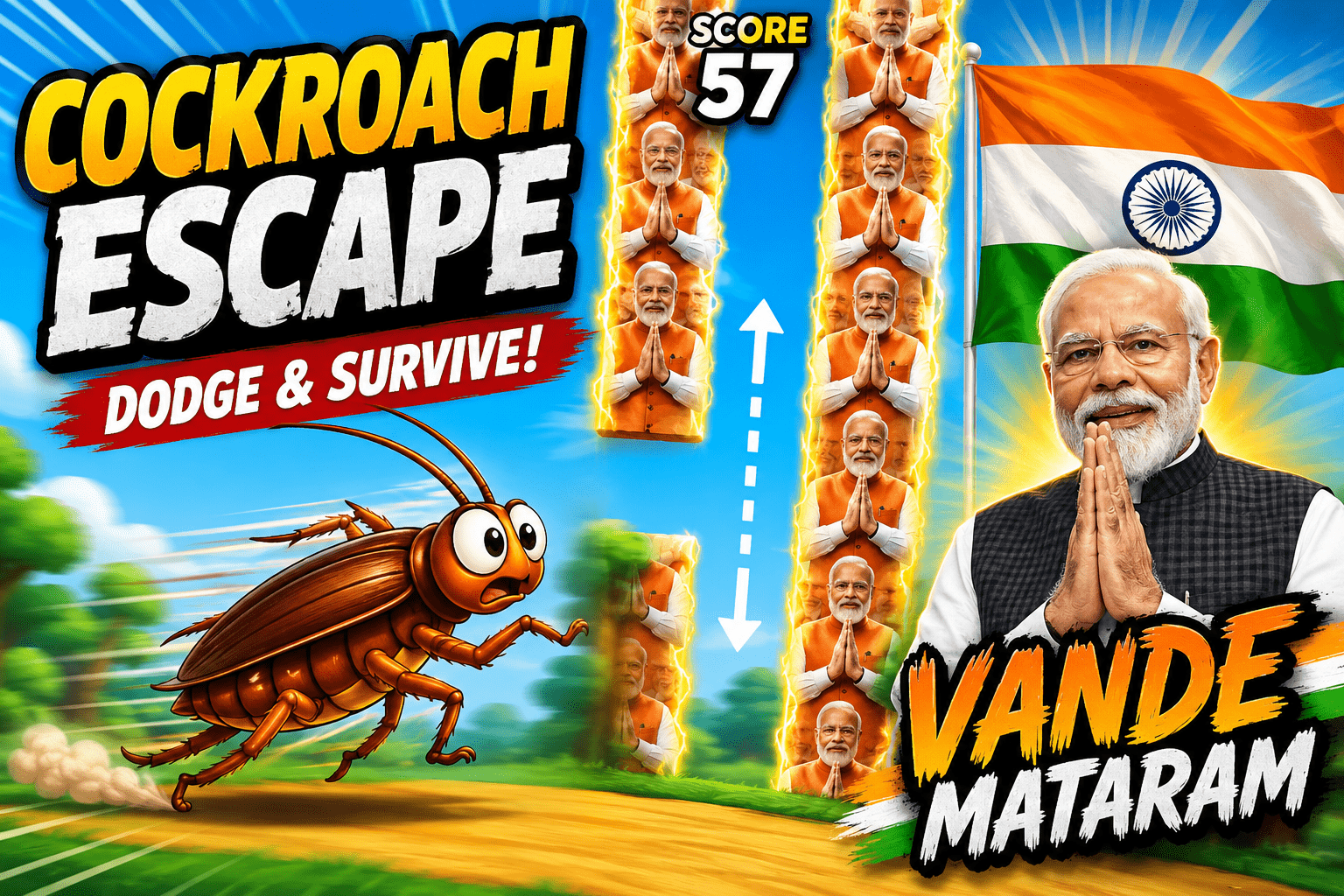
in this game you will play as cockroach and you have to survive. if you score 20 points then speed will increase little bit and after 40 points same thing will be happen, it means after every 20 points the speed will increase. this game just for fun do not take it serious.
How to Run the Game
Step 1: Install Python
Download and install Python from:
https://www.python.org/downloads/
✔ Check Add Python to PATH during installation.
Step 2: Install Pygame
Open Command Prompt and run:
pip install pygameIf it doesn’t work:
python -m pip install pygameStep 3: Download Project
Extract the project folder.
Example:
CockroachEscape/
│
├── game.py
├── modiji.png
Step 4: Open Terminal
Open Command Prompt inside the project folder.
Example:
cd Desktop\CockroachEscapeStep 5: Run the Game
python game.pyor
py game.pyControls
- ⬆ Up Arrow → Move Up
- ⬇ Down Arrow → Move Down
- 🖱 Play → Start Game
- 🖱 Play Again → Restart Game
- 🖱 Exit → Close Game
Common Errors
No module named pygame
python -m pip install pygamemodiji.png not found
Make sure your folder looks like:
Note: You can use any image but name should be modiji.png
CockroachEscape/
│
├── game.py
├── modiji.png
import pygame
import random
import sys
import math
pygame.init()
# =========================================================
# SETTINGS
# =========================================================
WIDTH = 500
HEIGHT = 700
FPS = 60
screen = pygame.display.set_mode((WIDTH, HEIGHT))
pygame.display.set_caption("Cockroach Escape")
clock = pygame.time.Clock()
# =========================================================
# COLORS
# =========================================================
SKY_BLUE = (105, 195, 245)
WHITE = (255, 255, 255)
BLACK = (20, 20, 20)
TREE_GREEN = (30, 140, 65)
TREE_DARK = (20, 100, 45)
TREE_LIGHT = (60, 170, 80)
TREE_TRUNK = (110, 70, 35)
GROUND_COLOR = (205, 175, 90)
GRASS_GREEN = (45, 150, 65)
BROWN = (85, 42, 20)
LIGHT_BROWN = (135, 75, 35)
DARK_BROWN = (45, 25, 15)
SAFFRON = (255, 153, 51)
FLAG_WHITE = (255, 255, 255)
FLAG_GREEN = (19, 136, 8)
NAVY_BLUE = (0, 0, 128)
BUTTON_GREEN = (30, 180, 80)
BUTTON_DARK_GREEN = (15, 120, 50)
RED = (220, 40, 40)
DARK_RED = (150, 20, 20)
# =========================================================
# FONTS
# =========================================================
score_font = pygame.font.Font(None, 60)
normal_font = pygame.font.Font(None, 38)
small_font = pygame.font.Font(None, 24)
flag_font = pygame.font.Font(None, 52)
button_font = pygame.font.Font(None, 55)
title_font = pygame.font.Font(None, 65)
# =========================================================
# PLAYER SETTINGS
# =========================================================
PLAYER_X = 100
PLAYER_WIDTH = 60
PLAYER_HEIGHT = 45
PLAYER_SPEED = 6
# =========================================================
# OBSTACLE SETTINGS
# =========================================================
OBSTACLE_WIDTH = 90
OBSTACLE_GAP = 210
OBSTACLE_DISTANCE = 300
BASE_OBSTACLE_SPEED = 4
SPEED_INCREASE = 0.5
GROUND_HEIGHT = 60
# =========================================================
# LOAD TRANSPARENT PNG
# =========================================================
try:
modi_image = pygame.image.load(
"modiji.png"
).convert_alpha()
except pygame.error as error:
print("ERROR: modiji.png not found!")
print("Keep modiji.png in the same folder as game.py")
print(error)
pygame.quit()
sys.exit()
# Keep PNG transparency while resizing
modi_image = pygame.transform.smoothscale(
modi_image,
(
OBSTACLE_WIDTH,
130
)
)
# =========================================================
# BUTTONS
# =========================================================
PLAY_BUTTON = pygame.Rect(
WIDTH // 2 - 100,
400,
200,
75
)
PLAY_AGAIN_BUTTON = pygame.Rect(
WIDTH // 2 - 110,
475,
220,
65
)
EXIT_BUTTON = pygame.Rect(
WIDTH // 2 - 110,
555,
220,
65
)
# =========================================================
# CLOUDS
# =========================================================
clouds = [
{
"x": 50,
"y": 80,
"speed": 0.4,
"scale": 1.0
},
{
"x": 300,
"y": 150,
"speed": 0.7,
"scale": 0.8
},
{
"x": 600,
"y": 60,
"speed": 0.5,
"scale": 1.2
}
]
# =========================================================
# TREES
# =========================================================
trees = []
for i in range(8):
trees.append(
{
"x": i * 100,
"height": random.randint(100, 180),
"speed": random.uniform(0.7, 1.2)
}
)
# =========================================================
# CLOUD
# =========================================================
def draw_cloud(cloud):
x = int(cloud["x"])
y = int(cloud["y"])
scale = cloud["scale"]
pygame.draw.circle(
screen,
WHITE,
(x, y),
int(25 * scale)
)
pygame.draw.circle(
screen,
WHITE,
(
x + int(30 * scale),
y - int(10 * scale)
),
int(35 * scale)
)
pygame.draw.circle(
screen,
WHITE,
(
x + int(65 * scale),
y
),
int(27 * scale)
)
pygame.draw.ellipse(
screen,
WHITE,
(
x - int(10 * scale),
y,
int(90 * scale),
int(35 * scale)
)
)
def update_clouds():
for cloud in clouds:
cloud["x"] -= cloud["speed"]
if cloud["x"] < -150:
cloud["x"] = (
WIDTH
+ random.randint(50, 200)
)
cloud["y"] = random.randint(
50,
200
)
# =========================================================
# TREES
# =========================================================
def draw_tree(tree):
x = int(tree["x"])
tree_height = tree["height"]
ground_y = HEIGHT - GROUND_HEIGHT
trunk_height = tree_height // 2
pygame.draw.rect(
screen,
TREE_TRUNK,
(
x + 30,
ground_y - trunk_height,
25,
trunk_height
)
)
leaf_y = ground_y - tree_height
pygame.draw.circle(
screen,
TREE_DARK,
(
x + 15,
leaf_y + 50
),
45
)
pygame.draw.circle(
screen,
TREE_GREEN,
(
x + 50,
leaf_y + 30
),
55
)
pygame.draw.circle(
screen,
TREE_LIGHT,
(
x + 80,
leaf_y + 55
),
42
)
pygame.draw.circle(
screen,
TREE_GREEN,
(
x + 45,
leaf_y + 70
),
50
)
def update_trees():
for tree in trees:
tree["x"] -= tree["speed"]
if tree["x"] < -120:
max_x = max(
current_tree["x"]
for current_tree in trees
)
tree["x"] = (
max_x
+ random.randint(80, 150)
)
tree["height"] = random.randint(
100,
180
)
# =========================================================
# COCKROACH
# =========================================================
def draw_cockroach(x, y, animation_time):
x = int(x)
y = int(y)
leg_move = math.sin(
animation_time * 15
) * 5
antenna_move = math.sin(
animation_time * 8
) * 5
# LEFT LEGS
pygame.draw.line(
screen,
DARK_BROWN,
(x + 22, y + 15),
(x - 10, y + 5 + leg_move),
4
)
pygame.draw.line(
screen,
DARK_BROWN,
(x + 22, y + 20),
(x - 12, y + 22 - leg_move),
4
)
pygame.draw.line(
screen,
DARK_BROWN,
(x + 25, y + 25),
(x - 5, y + 40 + leg_move),
4
)
# RIGHT LEGS
pygame.draw.line(
screen,
DARK_BROWN,
(x + 35, y + 15),
(x + 65, y + 2 - leg_move),
4
)
pygame.draw.line(
screen,
DARK_BROWN,
(x + 35, y + 20),
(x + 70, y + 22 + leg_move),
4
)
pygame.draw.line(
screen,
DARK_BROWN,
(x + 35, y + 25),
(x + 65, y + 42 - leg_move),
4
)
# BODY
pygame.draw.ellipse(
screen,
BROWN,
(
x + 5,
y + 5,
48,
30
)
)
pygame.draw.ellipse(
screen,
LIGHT_BROWN,
(
x + 13,
y + 8,
20,
24
)
)
pygame.draw.line(
screen,
DARK_BROWN,
(x + 29, y + 7),
(x + 29, y + 33),
2
)
# HEAD
pygame.draw.circle(
screen,
DARK_BROWN,
(
x + 52,
y + 19
),
11
)
# EYE
pygame.draw.circle(
screen,
WHITE,
(
x + 57,
y + 15
),
3
)
# ANTENNA
pygame.draw.line(
screen,
DARK_BROWN,
(x + 57, y + 12),
(
x + 82,
y - 8 + antenna_move
),
2
)
pygame.draw.line(
screen,
DARK_BROWN,
(x + 59, y + 17),
(
x + 87,
y + 10 - antenna_move
),
2
)
# =========================================================
# TRANSPARENT PNG OBSTACLE
# =========================================================
def draw_modi_images(
x,
start_y,
area_height
):
x = int(x)
start_y = int(start_y)
area_height = int(area_height)
image_height = modi_image.get_height()
current_y = start_y
end_y = start_y + area_height
while current_y < end_y:
remaining_height = (
end_y - current_y
)
if remaining_height >= image_height:
screen.blit(
modi_image,
(
x,
current_y
)
)
else:
image_part = pygame.Surface(
(
OBSTACLE_WIDTH,
remaining_height
),
pygame.SRCALPHA
)
image_part.blit(
modi_image,
(
0,
0
)
)
screen.blit(
image_part,
(
x,
current_y
)
)
current_y += image_height
def draw_obstacle(obstacle):
x = obstacle["x"]
top_height = obstacle["top_height"]
draw_modi_images(
x,
0,
top_height
)
bottom_y = (
top_height
+ OBSTACLE_GAP
)
bottom_height = (
HEIGHT
- bottom_y
- GROUND_HEIGHT
)
draw_modi_images(
x,
bottom_y,
bottom_height
)
# =========================================================
# CREATE OBSTACLE
# =========================================================
def create_obstacle(x):
return {
"x": x,
"top_height": random.randint(
100,
370
),
"passed": False
}
# =========================================================
# GAME SPEED
# =========================================================
def get_game_speed(score):
speed_level = score // 20
return (
BASE_OBSTACLE_SPEED
+ speed_level * SPEED_INCREASE
)
# =========================================================
# COLLISION
# =========================================================
def check_collision(
player_rect,
obstacles
):
if player_rect.top <= 0:
return True
if (
player_rect.bottom
>= HEIGHT - GROUND_HEIGHT
):
return True
for obstacle in obstacles:
top_rect = pygame.Rect(
obstacle["x"],
0,
OBSTACLE_WIDTH,
obstacle["top_height"]
)
bottom_y = (
obstacle["top_height"]
+ OBSTACLE_GAP
)
bottom_rect = pygame.Rect(
obstacle["x"],
bottom_y,
OBSTACLE_WIDTH,
HEIGHT
- bottom_y
- GROUND_HEIGHT
)
if player_rect.colliderect(
top_rect
):
return True
if player_rect.colliderect(
bottom_rect
):
return True
return False
# =========================================================
# BACKGROUND
# =========================================================
def draw_background():
screen.fill(SKY_BLUE)
pygame.draw.circle(
screen,
(255, 225, 90),
(
420,
70
),
45
)
for cloud in clouds:
draw_cloud(cloud)
for tree in trees:
draw_tree(tree)
pygame.draw.rect(
screen,
GRASS_GREEN,
(
0,
HEIGHT - GROUND_HEIGHT - 15,
WIDTH,
20
)
)
pygame.draw.rect(
screen,
GROUND_COLOR,
(
0,
HEIGHT - GROUND_HEIGHT,
WIDTH,
GROUND_HEIGHT
)
)
# =========================================================
# INDIAN FLAG
# =========================================================
def draw_indian_flag():
flag_width = 300
flag_height = 180
flag_x = (
WIDTH - flag_width
) // 2
flag_y = 130
stripe_height = flag_height // 3
pygame.draw.rect(
screen,
SAFFRON,
(
flag_x,
flag_y,
flag_width,
stripe_height
)
)
pygame.draw.rect(
screen,
FLAG_WHITE,
(
flag_x,
flag_y + stripe_height,
flag_width,
stripe_height
)
)
pygame.draw.rect(
screen,
FLAG_GREEN,
(
flag_x,
flag_y + stripe_height * 2,
flag_width,
stripe_height
)
)
chakra_x = WIDTH // 2
chakra_y = (
flag_y
+ stripe_height
+ stripe_height // 2
)
pygame.draw.circle(
screen,
NAVY_BLUE,
(
chakra_x,
chakra_y
),
23,
3
)
for i in range(24):
angle = (
2
* math.pi
* i
/ 24
)
end_x = (
chakra_x
+ math.cos(angle) * 21
)
end_y = (
chakra_y
+ math.sin(angle) * 21
)
pygame.draw.line(
screen,
NAVY_BLUE,
(
chakra_x,
chakra_y
),
(
int(end_x),
int(end_y)
),
1
)
# =========================================================
# START SCREEN
# =========================================================
def draw_start_screen():
draw_background()
title = title_font.render(
"COCKROACH ESCAPE",
True,
BLACK
)
screen.blit(
title,
title.get_rect(
center=(
WIDTH // 2,
220
)
)
)
draw_cockroach(
WIDTH // 2 - 30,
285,
animation_time
)
mouse_position = pygame.mouse.get_pos()
if PLAY_BUTTON.collidepoint(
mouse_position
):
button_color = BUTTON_DARK_GREEN
else:
button_color = BUTTON_GREEN
pygame.draw.rect(
screen,
button_color,
PLAY_BUTTON,
border_radius=15
)
pygame.draw.rect(
screen,
WHITE,
PLAY_BUTTON,
4,
border_radius=15
)
play_text = button_font.render(
"PLAY",
True,
WHITE
)
screen.blit(
play_text,
play_text.get_rect(
center=PLAY_BUTTON.center
)
)
control_text = small_font.render(
"Use UP / DOWN Arrow Keys",
True,
BLACK
)
screen.blit(
control_text,
control_text.get_rect(
center=(
WIDTH // 2,
520
)
)
)
# =========================================================
# GAME OVER
# =========================================================
def draw_collision_screen(score):
overlay = pygame.Surface(
(
WIDTH,
HEIGHT
),
pygame.SRCALPHA
)
overlay.fill(
(
0,
0,
0,
150
)
)
screen.blit(
overlay,
(
0,
0
)
)
draw_indian_flag()
vande_text = flag_font.render(
"VANDE MATARAM",
True,
WHITE
)
screen.blit(
vande_text,
vande_text.get_rect(
center=(
WIDTH // 2,
350
)
)
)
score_text = normal_font.render(
f"Score: {score}",
True,
WHITE
)
screen.blit(
score_text,
score_text.get_rect(
center=(
WIDTH // 2,
410
)
)
)
mouse_position = pygame.mouse.get_pos()
if PLAY_AGAIN_BUTTON.collidepoint(
mouse_position
):
play_color = BUTTON_DARK_GREEN
else:
play_color = BUTTON_GREEN
if EXIT_BUTTON.collidepoint(
mouse_position
):
exit_color = DARK_RED
else:
exit_color = RED
pygame.draw.rect(
screen,
play_color,
PLAY_AGAIN_BUTTON,
border_radius=15
)
pygame.draw.rect(
screen,
WHITE,
PLAY_AGAIN_BUTTON,
3,
border_radius=15
)
play_again_text = normal_font.render(
"PLAY AGAIN",
True,
WHITE
)
screen.blit(
play_again_text,
play_again_text.get_rect(
center=PLAY_AGAIN_BUTTON.center
)
)
pygame.draw.rect(
screen,
exit_color,
EXIT_BUTTON,
border_radius=15
)
pygame.draw.rect(
screen,
WHITE,
EXIT_BUTTON,
3,
border_radius=15
)
exit_text = normal_font.render(
"EXIT",
True,
WHITE
)
screen.blit(
exit_text,
exit_text.get_rect(
center=EXIT_BUTTON.center
)
)
# =========================================================
# RESET GAME
# =========================================================
def reset_game():
player_y = HEIGHT // 2
obstacles = [
create_obstacle(
WIDTH + 100
),
create_obstacle(
WIDTH
+ 100
+ OBSTACLE_DISTANCE
),
create_obstacle(
WIDTH
+ 100
+ OBSTACLE_DISTANCE * 2
)
]
return (
player_y,
obstacles,
0,
False
)
# =========================================================
# INITIAL GAME
# =========================================================
(
player_y,
obstacles,
score,
game_over
) = reset_game()
animation_time = 0
running = True
game_started = False
# =========================================================
# MAIN LOOP
# =========================================================
while running:
dt = clock.tick(FPS) / 1000
animation_time += dt
# =====================================================
# EVENTS
# =====================================================
for event in pygame.event.get():
if event.type == pygame.QUIT:
running = False
if event.type == pygame.KEYDOWN:
if event.key == pygame.K_ESCAPE:
running = False
if event.type == pygame.MOUSEBUTTONDOWN:
if event.button == 1:
# PLAY
if (
not game_started
and PLAY_BUTTON.collidepoint(
event.pos
)
):
(
player_y,
obstacles,
score,
game_over
) = reset_game()
game_started = True
# PLAY AGAIN
elif (
game_over
and PLAY_AGAIN_BUTTON.collidepoint(
event.pos
)
):
(
player_y,
obstacles,
score,
game_over
) = reset_game()
game_started = True
# EXIT
elif (
game_over
and EXIT_BUTTON.collidepoint(
event.pos
)
):
running = False
# =====================================================
# START SCREEN
# =====================================================
if not game_started:
update_clouds()
update_trees()
draw_start_screen()
pygame.display.update()
continue
# =====================================================
# GAME
# =====================================================
keys = pygame.key.get_pressed()
if not game_over:
if keys[pygame.K_UP]:
player_y -= PLAYER_SPEED
if keys[pygame.K_DOWN]:
player_y += PLAYER_SPEED
update_clouds()
update_trees()
current_speed = get_game_speed(
score
)
for obstacle in obstacles:
obstacle["x"] -= current_speed
if (
obstacles[0]["x"]
+ OBSTACLE_WIDTH
< 0
):
obstacles.pop(0)
new_x = (
obstacles[-1]["x"]
+ OBSTACLE_DISTANCE
)
obstacles.append(
create_obstacle(
new_x
)
)
for obstacle in obstacles:
if (
obstacle["x"]
+ OBSTACLE_WIDTH
< PLAYER_X
and not obstacle["passed"]
):
obstacle["passed"] = True
score += 1
player_rect = pygame.Rect(
PLAYER_X + 5,
player_y + 5,
PLAYER_WIDTH - 5,
PLAYER_HEIGHT - 5
)
if check_collision(
player_rect,
obstacles
):
game_over = True
# =====================================================
# DRAW GAME
# =====================================================
draw_background()
for obstacle in obstacles:
draw_obstacle(
obstacle
)
draw_cockroach(
PLAYER_X,
player_y,
animation_time
)
# SCORE
score_text = score_font.render(
str(score),
True,
WHITE
)
screen.blit(
score_text,
score_text.get_rect(
center=(
WIDTH // 2,
45
)
)
)
# SPEED LEVEL
speed_level = (
score // 20
) + 1
level_text = small_font.render(
f"Speed Level: {speed_level}",
True,
BLACK
)
screen.blit(
level_text,
(
10,
10
)
)
# CONTROLS
control_text = small_font.render(
"UP / DOWN Arrow - Move",
True,
BLACK
)
screen.blit(
control_text,
(
10,
HEIGHT - 35
)
)
# GAME OVER
if game_over:
draw_collision_screen(
score
)
pygame.display.update()
# =========================================================
# EXIT
# =========================================================
pygame.quit()
sys.exit()